

Effective CCTV maintenance isn’t just about ticking boxes; it’s about being proactive. Regular, hands-on checks of your cameras, connections, and recording gear are what keep the whole system running smoothly. It’s how you spot potential failures before they happen, making sure your surveillance network is actually working when you need it most.
Why Proactive CCTV Maintenance Is Your First Line of Defence
Thinking of your CCTV system as a ‘set it and forget it’ installation is one of the biggest mistakes a business can make. It’s a dynamic asset, and it needs consistent attention to do its job properly. Without that proactive care, your security setup isn’t just sitting there silently—it’s a liability waiting for the worst possible moment to fail. The real cost of doing nothing isn’t a future repair bill; it’s the damage you have to deal with after an incident you could have prevented.
Let’s get real for a moment. Picture a construction site getting hit overnight, losing thousands of pounds in copper wiring. You go to check the footage, but the hard drive has been corrupted for months, completely undetected. It’s useless. Or think of a retail manager trying to investigate a slip-and-fall claim, only to find the camera in that aisle was knocked out of focus weeks ago and has been recording a lovely shot of the ceiling ever since. These aren’t just hypotheticals; they’re the direct, painful result of skipping routine maintenance.
The Real Cost of System Failure
The cost of a proper maintenance plan is a predictable, manageable expense. On the flip side, the financial and reputational damage from system downtime can be devastating and ripple through your entire business. Consistent upkeep is far more than just fixing the odd technical glitch. It’s a fundamental business strategy that pays for itself.
- Ensuring Security Integrity: Regular checks are the only way to be sure every camera is recording, every angle is correct, and every part of the system is working as it should.
- Upholding Legal Duties: In the UK, running a CCTV system makes you a data controller. That comes with serious responsibilities under the Data Protection Act 2018 and UK GDPR. Maintenance is a key part of keeping your system compliant.
- Maintaining Operational Continuity: A reliable surveillance system does more than just deter crime. It underpins your health and safety protocols, helps resolve disputes, and protects your assets, all of which are vital for keeping the business running smoothly.
Proactive maintenance transforms your CCTV system from a passive box that records things into an active, reliable guardian for your premises. It’s the difference between having evidence when you need it and having a false sense of security.
A Growing Need for Diligence
The sheer number of cameras in the UK—with estimates ranging from 4 to 7.5 million—highlights just how crucial proper system management is. As the technology evolves, especially with the introduction of AI-powered CCTV, the maintenance becomes more complex. This can be a real challenge for smaller organisations trying to balance the costs of hardware, software, and data services. You can explore more data on UK CCTV usage and market trends to get a sense of the scale.
Ultimately, a robust maintenance strategy is an investment in certainty. It ensures your first line of defence is always ready, protecting your business, your people, and your reputation from threats that can appear out of nowhere. Neglecting it is a gamble no business can afford to take.
Your Essential CCTV Maintenance Schedule
A CCTV system is only ever as good as its last check-up. Waiting for a camera to go down or a recording to fail isn’t a strategy; it’s a gamble. A proper maintenance plan is all about being proactive, building a structured routine that turns upkeep from an afterthought into a core part of your security process.
Think of it like servicing a company vehicle – you wouldn’t wait for the engine to seize before checking the oil. The same logic applies here. Small, consistent checks are what prevent those big, costly failures, making sure your system is always ready when you need it most. By breaking the work down into weekly, monthly, and quarterly tasks, the whole process becomes far more manageable and effective.
Ignoring this routine has a clear and predictable outcome. A small, unchecked fault can easily cascade into a full system failure.
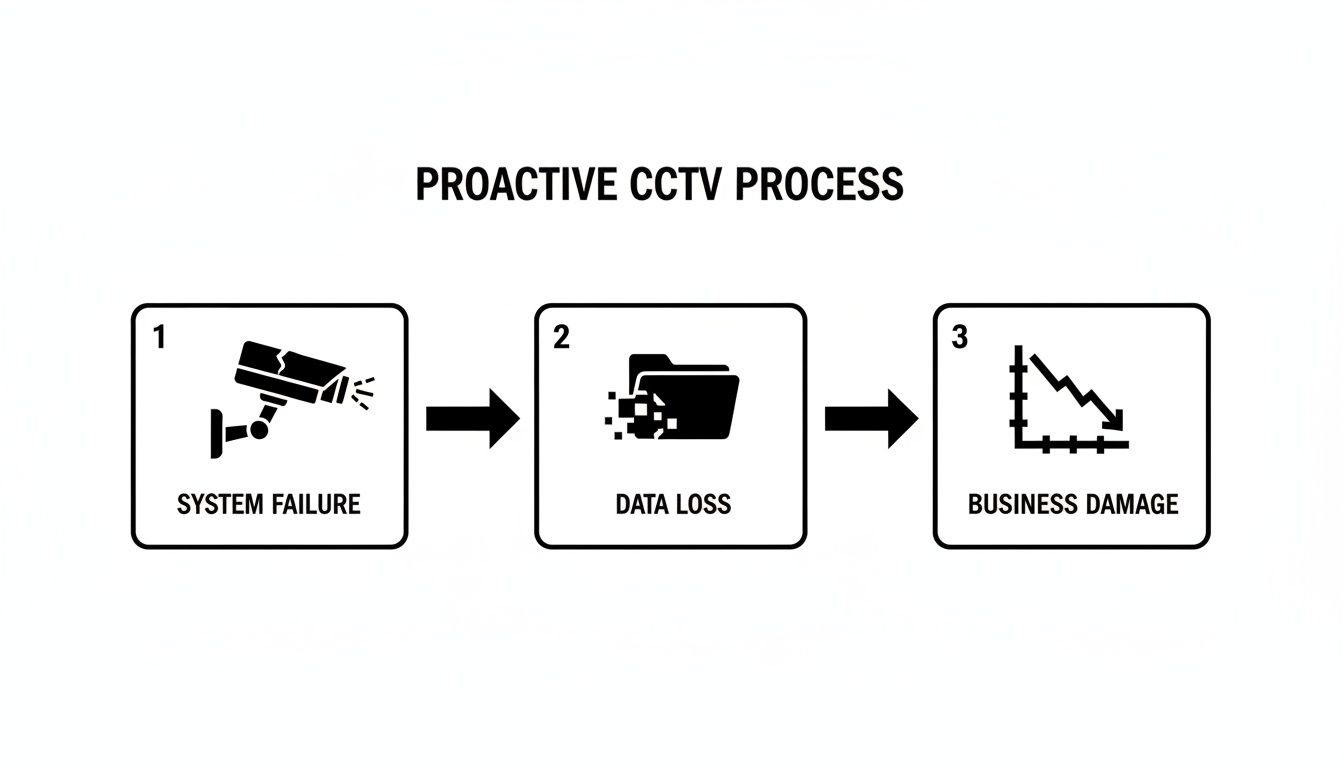
As the diagram shows, a neglected system leads directly to technical failure. That means lost data and, ultimately, real damage to your business operations and security.
A Practical Preventive Schedule
To make this simple, I’ve broken down the key tasks into a schedule based on how often they need doing. This isn’t just a checklist; it’s a framework for building a reliable, long-lasting surveillance system.
| Preventive CCTV Maintenance Schedule | ||
|---|---|---|
| Frequency | Task | Why It Matters |
| Weekly | Confirm Live Feeds: Log in and quickly check every camera is online and displaying a clear picture. | Catches immediate failures (e.g., a dead camera or network issue) before an incident occurs. A black screen is a blind spot. |
| Visual Obstruction Check: Physically look at cameras to spot new obstructions like overgrown trees, stacked materials, or even a spiderweb on the lens. | A blocked camera is useless. This ensures you always have the intended field of view clear and unobstructed. | |
| Verify Recording Status: Check the DVR/NVR to confirm it’s actively recording footage. Look for the recording icon or status light. | This is the most critical check. Without a recording, the entire system serves no purpose during an investigation. | |
| Monthly | Clean Lenses & Housings: Use a microfibre cloth and proper cleaning solution to wipe down all camera lenses and enclosures. | Dirt, dust, and water spots drastically reduce image quality, especially at night when infrared relies on a clean lens. |
| Inspect Physical Connections: Check visible wiring and connections for any signs of fraying, corrosion, or loose fittings. | Damaged cables are a common point of failure. Catching this early prevents intermittent signal loss or total camera failure. | |
| Test Motion Detection Settings: Trigger alarms in key areas to ensure they are working as expected without generating constant false positives. | Poorly calibrated motion detection either misses real events or floods your system with useless alerts, causing ‘alarm fatigue’. | |
| Quarterly | Perform Firmware Updates: Check the manufacturer’s website for firmware updates for cameras and recorders. | This is a crucial cybersecurity step. Updates patch vulnerabilities that could be exploited to compromise your system. |
| Audit Storage Health: Check hard drive status, look for error logs, and ensure there’s enough capacity for your required retention period. | A failing hard drive means lost evidence. This check ensures your footage is being stored reliably. | |
| Review User Access Logs: Audit who has access to the system. Remove old employees or users who no longer need access. | Protects sensitive footage from unauthorised viewing and is a key data protection compliance requirement. |
Following a schedule like this transforms your CCTV from a passive recorder into an active and reliable security asset. It’s the difference between having footage when you need it and discovering a problem after the fact.
Troubleshooting Common CCTV System Faults
Even the most well-kept CCTV system will have its off days. When a screen suddenly goes black or an image starts to dance, it’s natural to think the worst. But more often than not, the fix is far simpler than you’d expect.
Think of this as a first-aid guide for your surveillance setup. We’ll walk through the logical steps to diagnose the usual suspects before you need to get an engineer on the phone. It’s a bit like a lamp flickering at home – you’d check the bulb and the plug before calling an electrician, right? The same logic applies here, and it can save you a fair bit of time and money.
Dealing with Flickering or Rolling Images
A camera feed that just won’t stay still is one of the most common and annoying issues. When an image is flickering, rolling, or looking distorted, it’s almost always a sign of a power problem or signal interference, not a broken camera.
Before you even think about getting a ladder out, start at the recorder. The classic culprit is something called ground loop interference. This happens when different bits of your system are plugged into power sources with slightly different electrical grounds, creating a tiny current that messes with the video signal.
An unstable power supply is another frequent offender. Take a look at the camera’s power adapter and its connections. Is everything plugged in tightly? Is the power brick warm, but not worryingly hot? Sometimes, just unplugging the power connector and plugging it back in does the trick. If you notice several cameras acting up, the problem might be with the main power unit for your NVR or DVR.
When a Single Camera Feed Disappears
That sudden black screen where a live feed should be can cause a moment of panic, but it’s rarely a sign of a dead camera. The problem is far more likely to be a simple loss of power or a bad connection somewhere along the line.
A methodical check is your best bet here. Start with the easy stuff first:
- Check the Software: First, log into your NVR or DVR. Can the system still see the camera? A quick reboot of the main recording unit can often force it to reconnect.
- Verify the Connections: Have a look at the back of the recorder and find the cable for that specific camera. Make sure the network or BNC connector is pushed in firmly. A little wiggle will tell you if it’s loose.
- Inspect the Power Source: Follow the power cable for that camera. If it’s powered by a local plug, check the adapter. If it’s a modern IP camera using Power over Ethernet (PoE), check the network switch. Most switches have little lights on each port that show if a device is connected and drawing power.
- Test the Cable: If you have a cable tester or a spare camera you know works, now is the time to use it. Damaged cables are a massive point of failure, especially on busy construction sites where they can get crushed or cut by accident.
By working through this list, you’re ruling out the most common and easily fixed problems one by one. Only when you’re certain the power and connections are solid should you start thinking the camera itself might have failed.
Fixing Scheduled Recording Failures
This one is particularly frustrating. You’ve told the system to record at certain times, but when you need the footage, there’s nothing there. This is a critical failure, but it’s almost always down to software settings, storage problems, or a failing hard drive.
First, dive into your NVR or DVR’s settings menu. Double-check that the recording schedule for the camera in question is actually set up correctly and, most importantly, enabled. It’s surprisingly easy to accidentally switch it off while making other tweaks.
Next, take a look at your storage. Has the hard drive filled up? Most systems are set to overwrite the oldest footage automatically, but if that setting has been turned off, it will simply stop recording. While you’re in the menu, find the hard drive’s health status. Look for any warnings or error logs—these are early signs that the drive might be on its way out.
The reliability of your system isn’t just a convenience; it has a real-world impact. When maintenance is neglected, fault rates can skyrocket. Some councils that have delayed system upgrades have seen outages affecting over half their cameras. One report highlighted a shocking 58.2% fault rate in Croydon. This just goes to show how proactive checks, including monitoring your storage health, are crucial for keeping the system running and making sure you get the coverage you’re paying for. You can discover more about how maintenance impacts system availability and its knock-on effect on operational costs.
Choosing Between In-House and Professional Maintenance
So, who’s going to keep your CCTV system in top working order? This is a bigger decision than it sounds, and it directly hits your security’s reliability and your budget. It’s not just about who gives the cameras a wipe down now and then. You’re really weighing the true costs and skills needed to manage this vital asset yourself versus handing the reins to the pros.
The choice really boils down to a balance of cost, expertise, and how much risk you’re willing to stomach. For some businesses, keeping it in-house feels like an obvious money-saver. For others, the peace of mind that comes with a professional contract is worth every penny. Let’s dig into what each option actually looks like on the ground.
The Realities of In-House Maintenance
At first glance, managing CCTV upkeep internally seems attractive, especially if you’re a smaller business keeping a close eye on every expense. The logic is simple: get a team member to do the basic checks and you sidestep a service contract fee. The problem is, the real cost of this approach is often hiding in plain sight.
First up, you have the expertise gap. Your staff are brilliant at their jobs, but they’re not trained security technicians. Sure, they can handle a simple visual check, but what happens when a hard drive is about to fail or a network issue takes a camera offline? You could be looking at serious downtime while they try to figure out a problem an expert would fix in minutes.
And then there are the practical costs you might not have considered:
- Training Time: Getting an employee up to speed on your specific system takes them away from their day job. This isn’t a one-off cost either, especially with staff turnover.
- Specialised Tools: Professional-grade gear like network cable testers or diagnostic software isn’t something you pick up at the local hardware shop. Without them, you’re just guessing.
- Hidden Labour Costs: Every hour your team spends googling error codes, ordering parts, and attempting fixes is an hour they’re not focused on their actual role. These “soft costs” add up faster than you think.
A small café with four cameras might be perfectly fine with the manager doing weekly visual checks. But if you’re a logistics company with multiple sites and an integrated system, relying on untrained staff is a massive operational risk.
Understanding Professional Maintenance Contracts
Outsourcing your CCTV maintenance to a specialist firm like Executive Securities Personnel Ltd moves the responsibility from your team to experienced technicians. These contracts aren’t a one-size-fits-all deal; they’re usually tailored to provide different service levels based on your specific needs and budget.
While there’s a clear financial commitment, it’s a predictable operational expense. The cost of neglect, on the other hand, can be astronomical. Just look at the public sector: a recent report on public surveillance found London councils spent nearly £16 million on maintenance and repairs for over 16,000 cameras. That works out to an average of about £973 per camera for the year.
The same report highlighted that boroughs with poor maintenance saw fault rates as high as 58.2%, basically rendering their systems useless. In contrast, those with proper asset management kept downtime below 2%. It’s a stark reminder of the real-world cost of upkeep. You can dive deeper into how maintenance investment impacts CCTV reliability in these findings.
Comparing Your Options Side-by-Side
To make the right call, you need to see the options laid out clearly. Consider your business context—how complex is your system? What skills does your team actually have? And what’s your tolerance for security risks?
A side-by-side comparison can make the decision much clearer.
Comparing In-House and Contracted CCTV Maintenance
| Factor | In-House Maintenance | Professional Maintenance Contract |
|---|---|---|
| Cost Structure | Lower upfront cost, but you face unpredictable repair bills and hidden labour costs. | A fixed, predictable contract fee makes budgeting simple and straightforward. |
| Expertise | Limited to your staff’s knowledge. Complex issues often mean an expensive emergency call-out. | You get access to trained, certified technicians who’ve seen it all before. |
| Response Time | Depends entirely on your staff’s availability and their ability to diagnose the fault. | Guaranteed response times are written into your Service Level Agreement (SLA). |
| Compliance | The responsibility for keeping up with UK GDPR and other regulations is all on you. | The pros are well-versed in legal requirements and help ensure you stay compliant. |
| Peace of Mind | A constant nagging worry about whether the system is actually working when you need it. | The assurance that your system is being proactively managed by experts. |
In the end, this choice is all about risk management. An in-house approach might save a bit of cash in the short term, but it leaves you exposed to extended downtime, compliance headaches, and unexpected costs. A professional contract, on the other hand, gives you certainty, expertise, and the confidence that your first line of defence is always ready to go.
Navigating UK Legal and Compliance Obligations
The moment you switch on a CCTV system in the UK, you become a data controller. That’s not just a fancy title; it comes with some serious legal weight. It’s easy to focus on the hardware, but you’re actually handling personal data, and good maintenance of cctv is fundamental to doing that correctly and staying on the right side of the law.
The two main pieces of legislation to get your head around are the Data Protection Act 2018 and the UK General Data Protection Regulation (UK GDPR). These rules dictate exactly how you capture, store, and share footage of identifiable people. Get it wrong, and you could be looking at hefty fines from the Information Commissioner’s Office (ICO). This is why weaving compliance checks into your routine upkeep isn’t just a good idea—it’s essential.
Verifying Camera Views and Signage
It’s amazing how easily a camera can be knocked off-kilter. A bit of harsh weather or even a window cleaner’s ladder can shift its position, and suddenly you’re recording a neighbour’s back garden or a public pavement you have no business monitoring. This is a classic, and entirely avoidable, privacy intrusion.
Make this a non-negotiable part of your monthly checks:
- Audit Camera Positions: Pull up the live feed for every single camera. Does the view match what it’s supposed to be? Make sure it’s focused squarely on your property and the specific areas you’ve identified as needing surveillance.
- Inspect Signage Visibility: UK GDPR is very clear on this: you need prominent, clear signs telling people they’re being recorded. Are yours still legible? Or are they covered in grime, faded, or hidden behind an overgrown bush? The sign must also identify who is operating the system (your company) and why.
A camera’s view drifting by a few degrees can be the difference between a compliant security system and a formal complaint. This check takes five minutes and can save you a world of trouble.
Ensuring Data Security and Access Control
Your responsibilities don’t stop at what the camera sees. How you protect the recorded footage is just as important in the eyes of the law. Your maintenance schedule has to cover the security of the data itself. This isn’t just a job for the IT department; it’s a core compliance task for whoever manages the system.
Every quarter, you should be doing a deep dive into your recording device (the DVR or NVR). This is where you need to get forensic about who has access. Are ex-employees still in the system? Who holds the password for exporting footage? You absolutely must keep a current log of authorised users.
And remember, you have a legal duty to provide footage to individuals or the police if they submit a lawful request, known as a Subject Access Request (SAR). A well-maintained system makes this simple. But if you can’t retrieve the footage because of a hard drive failure you missed, you’re likely to be found non-compliant.
Integrating Compliance into Your Routine
The smartest way to handle your legal obligations is to bake them right into your maintenance checklist. This transforms compliance from a daunting legal concept into a series of simple, practical actions. At the end of the day, it’s all about proving you’ve done your due diligence.
Try adding these tasks to your existing maintenance schedule:
- Policy Review: Once a year, sit down and read your official CCTV policy. Does it still accurately reflect why and how you’re using surveillance?
- Footage Retention Check: When you check your storage, confirm that the system is correctly auto-deleting footage after your stated retention period (e.g., 30 days). Holding onto data for longer than necessary is a breach.
- Secure Disposal: When a hard drive eventually gives up the ghost, don’t just bin it. It needs to be physically destroyed. Simply wiping the files isn’t secure enough to protect the personal data it once held.
By making these steps a standard part of your maintenance of cctv process, compliance becomes a habit, not a headache, protecting your business from unwanted fines and legal battles.
Your CCTV Maintenance Questions Answered
Even with a good checklist, you’re bound to have questions. Over the years, we’ve heard just about all of them. Here are some of the most common queries that come up, with some straight-talking answers to help you get it right.
How Often Do I Really Need a Professional Service?
This is a great question, and the honest answer is: it depends entirely on where your system is installed. For a quiet office or a small retail shop, getting a professional in once a year is usually spot on. They can handle the deeper stuff like firmware updates, internal hardware checks, and running diagnostics that you can’t.
But if you’re running a tougher site – think a dusty construction project, a busy warehouse, or anywhere with lots of public footfall – you really need to up that to at least twice a year. The cameras on these sites take a real beating from vibrations, dirt, and potential tampering, so they need an expert eye on them more often to stay reliable.
Can I Just Do All the Maintenance Myself?
You can, and should, handle all the regular spot-checks yourself. In fact, it’s vital. Things like weekly walk-arounds to check camera views, monthly lens cleaning, and clearing away cobwebs or overgrown branches are perfect jobs for you or your team. These simple habits are brilliant at catching small issues before they become big problems.
Where you need to be careful is with the more technical side of things. Unless you’ve got someone on staff who is properly trained in security systems, I’d strongly advise leaving tasks like network fault finding, checking hard drive health, or critical firmware updates to the professionals. It’s easy to accidentally cause more harm than good.
Think of it like this: you can top up the screen wash in your car, but you probably wouldn’t try to service the engine. The same principle applies here.
What are the Telltale Signs a CCTV Hard Drive is Failing?
A dying hard drive is a silent threat – if it goes, it takes all your recorded evidence with it. The good news is, they almost always give you a few warning signs before they give up completely.
- Odd Noises: Get your ear close to the recorder. Any clicking, grinding, or loud whirring sounds are a massive red flag. Healthy drives are very quiet.
- System Alerts: Your recorder will often flash up error messages like “HDD Error” or “Recording Failed.” These are not to be ignored.
- Gaps in Footage: This is a classic symptom. You go to review an incident and find a blank space in the timeline right where it should be. This means the drive is struggling to write the data.
- Sluggish Playback: If the system is slow and juddery when you try to watch recorded footage or even just navigate the menu, it could be the hard drive struggling to keep up.
Spotting any of these early gives you a window of opportunity to back up any vital footage and get the drive replaced before it fails for good.
Will My CCTV Maintenance (or Lack of It) Affect My Business Insurance?
Yes, it absolutely can, and this is something a lot of people overlook. Many commercial insurance policies include clauses that require you to keep your security systems in full working order. It’s part of your “duty of care.”
If you have a break-in and need to make a claim, the first thing the insurer’s loss adjuster might ask for is your CCTV maintenance log. If they discover the system wasn’t working because it hadn’t been looked after, they could argue you haven’t met the terms of your policy. This could lead to a reduced payout or, in the worst-case scenario, the claim being rejected entirely.
Keeping a detailed log of every check—from your own weekly inspections to the professional annual service—is your best proof. It shows you’ve been diligent and can be your saving grace during a claim.
Your security system is your first line of defence, but it’s only effective if it’s expertly maintained. For professional, reliable CCTV maintenance and 24/7 monitoring across Southampton and Hampshire, trust the experts at Executive Securities Personnel Ltd. Ensure your property is always protected by visiting us at https://www.executivesecurities.co.uk to discuss a tailored maintenance plan.